FREE Open source · Mac & Windows · Works offline
Split any song into stems, on your own computer.

Stemmer uses AI to pull vocals, drums, bass, guitar and piano out of any song or music video. Then you mix them, find the tempo, and export WAV. Your music never leaves your machine.

Free forever · No account · All releases

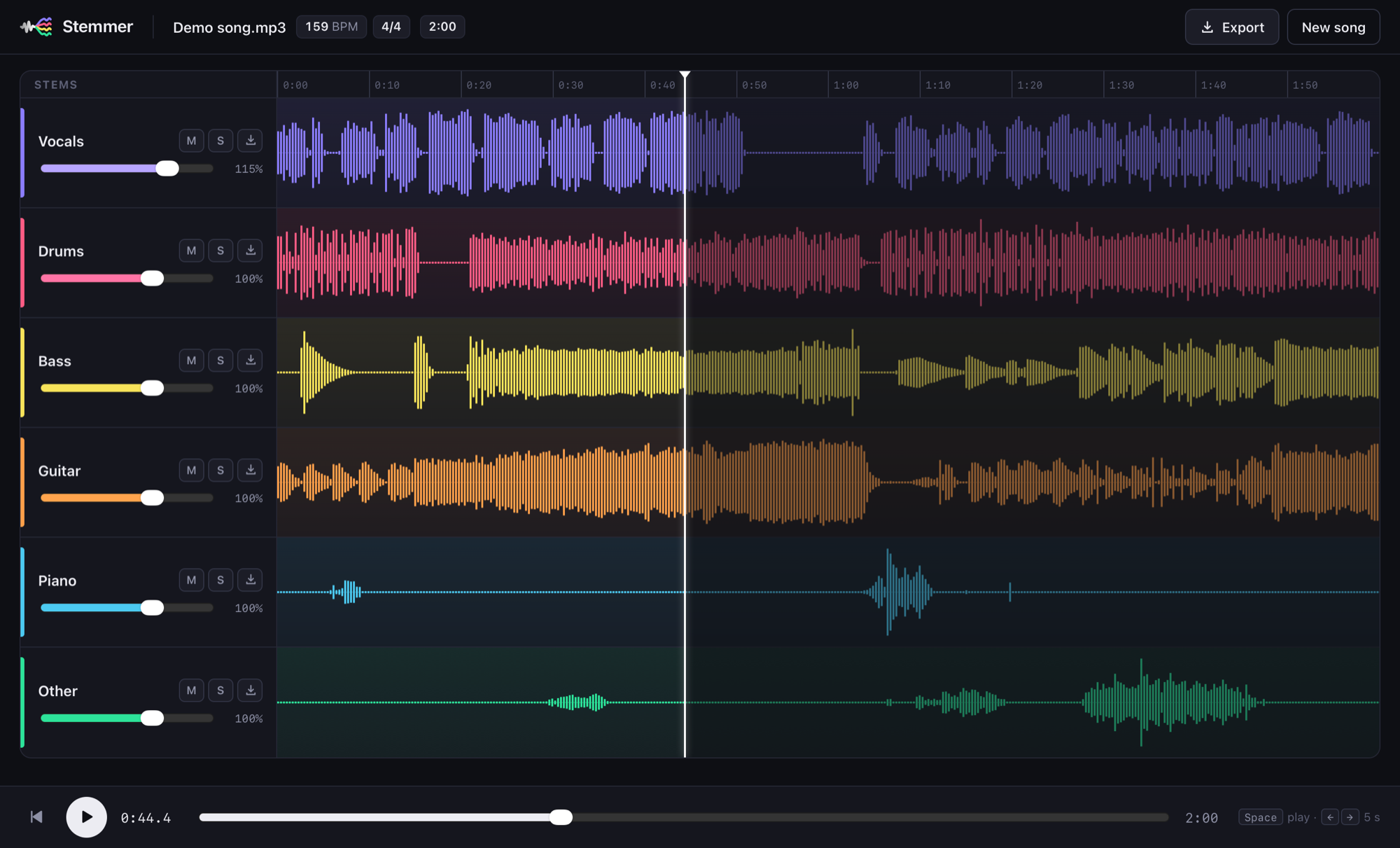
The Stemmer mixer: a song split into vocals, drums, bass, guitar, piano and other, each with its own waveform, volume, mute, solo and download, with 159 BPM and 4/4 detected

Features

A studio-grade stem splitter, minus the subscription

The same class of AI model as paid online services, running locally, with a real mixer around it.

4 or 6 stems

Vocals, drums, bass and other, or add guitar and piano. Powered by Meta's Hybrid Transformer Demucs.

Built-in mixer

Volume, mute and solo per stem, waveforms, click-to-seek and keyboard control. Every stem stays perfectly in sync.

Tempo and time signature

BPM and meter detected from the separated drums, so you know what to set your metronome or DAW to.

Private by design

The AI runs on your computer. No upload, no account, no tracking. Once installed, it works offline.

Audio or video in

MP3, WAV, FLAC, M4A and OGG, plus MP4, MOV, MKV and WEBM. Stemmer pulls the audio out of videos for you.

WAV export, three ways

Any single stem, all stems as a ZIP, or your own mix as one file, at full quality.

How it works

Drop, split, mix

No settings to learn. A 5-minute song takes about 2–3 minutes on an Apple Silicon Mac.

Drop a song

Drag in any audio or video file, or pick one. Choose 4 stems, or 6 if you want guitar and piano too.

AI splits it

Demucs separates the instruments on your computer's GPU or CPU, then Stemmer detects the tempo and meter.

VocalsDrumsBassOther

Mix and export

Mute the vocals for karaoke, solo the bass to learn a line, then export exactly what you hear.

Why Stemmer

Online splitters vs. Stemmer

Web services upload your files and charge for more stems or better downloads. Stemmer doesn't.

StemmerTypical online splitter
PriceFree, open sourceFree tier, then subscription
Your filesStay on your computerUploaded to their servers
Song limitsNoneDaily or monthly caps
Guitar and piano stemsIncludedOften paid
WAV exportIncludedOften paid
Tempo and time signatureIncludedRarely
Works offlineYesNo

Download

Get Stemmer

One download includes everything: the AI models, ffmpeg and the app. No Python or other setup needed.

macOS

Apple Silicon (M1 or newer) · macOS 12 or later ·

  1. Open the .dmg and drag Stemmer into Applications.
  2. The first time, macOS blocks it because the app isn't signed yet: go to System Settings → Privacy & Security and click Open Anyway. You only do this once.
Download for Mac

Windows

Windows 10 (1809+) or 11, 64-bit ·

  1. Run the setup .exe. It installs for your account, with no admin rights needed.
  2. If SmartScreen says "Windows protected your PC", click More info → Run anyway. The installer isn't code-signed yet.
Download for Windows

Intel Macs and Linux aren't supported yet. Build from source · Checksums and older versions

FAQ

Questions

Is it really free?

Yes. Stemmer is open source under the MIT license. There's no paid tier, no account and no limits on songs.

Is my music uploaded anywhere?

No. The AI model runs on your own computer, and Stemmer only talks to itself on your machine. After installing, it works with no internet connection.

Why does my computer warn me when I open it?

The app isn't signed with a paid Apple Developer ID or Windows code-signing certificate yet, so macOS and Windows show a one-time warning. The source code and build pipeline are public on GitHub, and each release lists SHA-256 checksums.

How long does a song take?

About 2–3 minutes for a 5-minute song on an Apple Silicon Mac. On Windows the AI runs on the CPU, so expect a few minutes, depending on your processor.

How good is the separation?

Stemmer uses Meta's Hybrid Transformer Demucs (htdemucs), one of the best open models for music source separation. Vocals, drums and bass come out very clean. Guitar and piano are harder and depend on the mix.

Can I use the stems commercially?

The app is free to use for anything, but the music belongs to its rights holders. Use stems from copyrighted songs for personal practice, study and transcription unless you have permission.